Lead Intelligence System
Every lead. Every rupee.One system that does the work.
FabTech Pulse runs the pipeline. Its copilot drafts, briefs and reports. FabTech PA takes instructions on Telegram. Built around how Indian project sales really work.
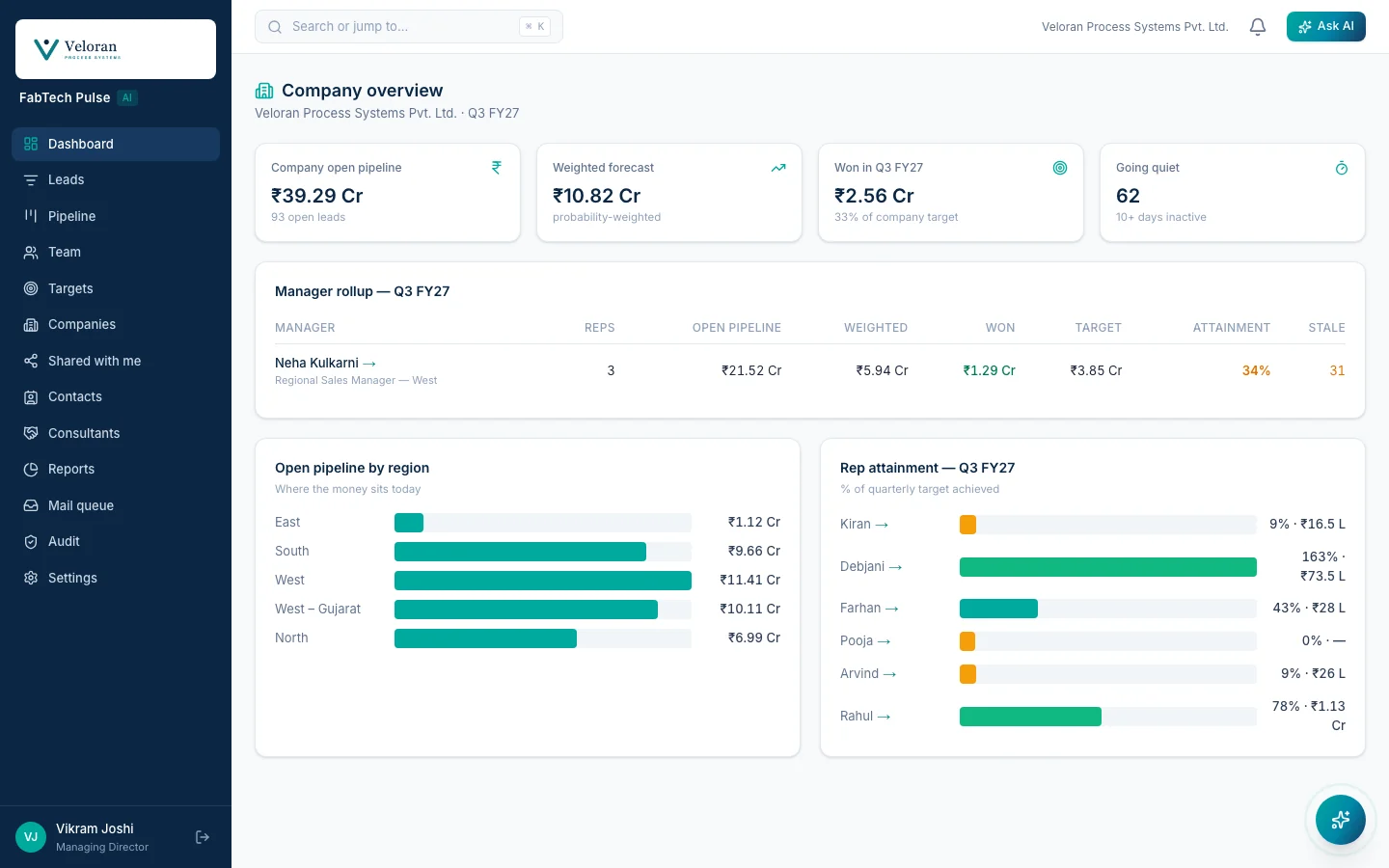
- Sept 2026
- In production with its first customer since then.
- 15 × 6
- Measures and groupings for any report asked for in plain English.
- 6 ways in
- Website, visiting cards, Projects Today, consultants, mailboxes, spreadsheets.
- Mumbai
- Where the app and its database run. One instance per client.
Every lead, from every source, on one board.
FabTech Pulse runs the sales side: every lead from every source, one pipeline, and a forecast computed from the records, not typed in by hand.
In production with its first customer since September 2026.
How a lead arrives
- Website enquiry form
- Visiting card, photographed
- Project listing, pasted in
- Consultant portal
Also from your own mailbox, or a spreadsheet.
Pipeline
Drag a lead to update its stage — every move is logged on the lead’s timeline
Modular OT for the new wing
Helix Formulations
Cold₹22 LFarhan Siddiqui
HVAC revamp, OSD block
Kosmo Lifesciences Pvt. Ltd.
Warm₹1.1 CrRohan Iyer
Process piping, phase 2
Nimbus Biologics Ltd.
Warm₹74 LKabir Sethi
Packing hall extension
Acme
Warm₹48 LNeha Kulkarni
Cleanroom panel upgrade
Aurelia Pharmaceuticals Ltd.
Hot₹1.35 CrRohan Iyer
Annual supply contract
Northwind
Warm₹64 LKabir Sethi
Weighted forecast
₹1.84 Cr
probability-weighted from ₹4.53 Cr open pipeline
- Inquiry × 10%₹2.2 L
- Qualified × 30%₹69.6 L
- Proposal × 50%₹67.5 L
- Negotiation × 70%₹44.8 L
FabTech Pulse, sample data
From first enquiry to signed order, on one record.
Every lead arrives the same way, whatever its source. Everything that happens to it afterwards lands on one timeline the whole team can see.
It arrives
Six ways in, one queue.
- Website enquiry form
- Visiting card, photographed
- Projects Today listing
- Consultant portal
- Your own mailbox
- A spreadsheet, with a dry run
It is checked
Duplicates caught, owners assigned.
- Matched on phone, email or company
- Merges can be undone
- Web enquiries wait for an owner
It is worked
Pipeline, timeline, next step.
- Every stage move is logged
- Emails, calls, notes, files
- An empty next step is flagged
It is talked to
From the rep’s own mailbox.
- Microsoft 365 or company mail
- Replies land on the deal
- Large files go as expiring links
It is quoted
Quotations, proposals, invoices.
- Drafted from the email thread
- Numbered, locked, on letterhead
- GST and amounts in words
It is counted
Won, lost, and why.
- Lost asks for a reason
- A win counts in its quarter
- Feeds forecast and reports
Open a deal and it is already summarised.
The briefing reads the whole timeline and suggests the next step. Ask the copilot about the deal and it answers from the record, with a link back to it.
- Hot, Warm or Cold, with the reason in a sentence
- A reply drafted from the thread, sent only after a read check
- A company brief from the client’s own website, with sources
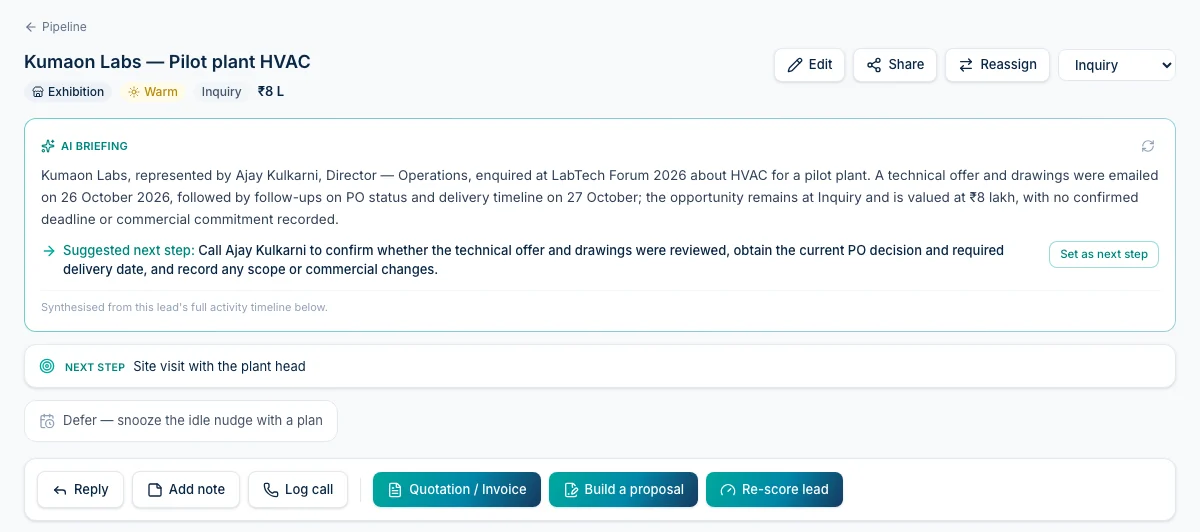
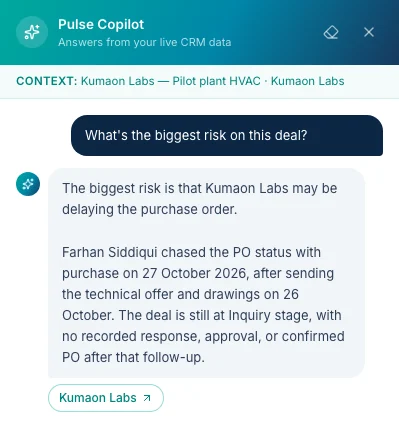
FabTech Pulse, real screens, sample data
Ask for the work. The copilot does it.
Quotations, proposals, follow-ups and company research, drafted from the company’s own email threads and records. A person checks it, and it goes out from their own address.
New quotation
The copilot drafts an itemised quote from the thread — rates only where the client stated them. You review, price and finalize before anything is sent.
QUOTATION
To: Northwind
Validity: 30 days
Subject: Revised quote, 40 tonnes
Drafted by AI from Raj’s email of 18 Nov
- Subtotal
- ₹74,70,000
- GST @ 18%
- ₹13,44,600
- Total
- ₹88,14,600
Drafts the quotation from the email thread.
Rates only where the client stated them. You price the rest and finalise.
Company brief
ResearchAurelia Pharmaceuticals Ltd.
- Opened a second oral-solids block in Pune this year.
- Hiring for validation and QA roles.
- Lists sterile injectables as its next expansion.
Researches the company before the call.
A short brief from the public web, with the pages it used.
AI Pulse — deals going quiet
Annual supply contractNegotiation
Northwind · ₹64 L · 12 days quiet
ToRaj (Northwind)
SubjectAnnual supply contract: next step
Hi Raj,
Following up on the revised quote for the 40 tonnes. We can make the delivery in two lots, as you asked. Could we confirm the order this week?
Drafted by AI — you’re responsible for what it says.
SendWrites the follow-up on a deal going quiet.
One click opens the lead with the email already drafted. It sends from your own Outlook.
- Executive Summary
- Understanding of Requirement
- Proposed Scope & Approach
- Commercial Summary
- Validity
Proposed Scope & Approach
ToneFormalConsultativeConcise
We will fabricate and install the SS 316L process piping for Northwind’s plant, then hydro test it and hand over the documentation. Material arrives in two lots, so site work can begin as soon as the first lands.
Commercial Summary
[amount to be confirmed]Writes the proposal. You set every price.
The copilot drafts the words in the tone you pick. Amounts stay blank until a person types them.
FabTech Pulse, sample data
Ask the business anything. Even why.
How the team is doing, why one region hits target and another doesn’t, what it takes to close the quarter. The copilot answers from the company’s own records, with every number worked out in code.
Why are we behind the Q3 target?
Q3 stands at ₹2.52 Cr of the ₹6 Cr target (42%), with about six weeks left.
West and South are on pace. North and East are behind:
- Kabir has 5 deals at Proposal worth ₹1.4 Cr, and 3 of them have been quiet for more than 10 days.
- Farhan has 2 qualified enquiries this quarter, the fewest on the team.
Target vs won, Q3 FY27
Bar = % of quarterly target achieved
The three quiet deals with Kabir are worth ₹96 L. Moving them this month is the fastest way to close the gap.
- Cleanroom retrofit · Nimbus Biologics
- Process piping · Kosmo Lifesciences
- HVAC revamp · Helix Formulations
Nudging creates a follow-up task for Kabir, after you confirm.
FabTech Pulse, sample data
Questions people ask
- How is the team doing this quarter?
- Why is the West on target and the North isn’t?
- Which deals are going quiet, and with whom?
- Compare this quarter with last quarter.
- What will it take to close Q3?(switching on)
- How does this year compare with last year?(switching on)
Forecasts and year-on-year comparisons come from the weekly management pack, which is switching on.
The code computes every number. The AI only writes the words around them.
Everything the sales side needs, in one place.
Each of these is in FabTech Pulse today.
Leads in
- Website enquiry form
- Visiting card scan
- Project listing scan
- Consultant portal
- Find my deals, from your mailbox
- Spreadsheet import
- Duplicate check and merge
Working a deal
- Pipeline board
- One timeline per lead
- Next step, always visible
- Tasks and follow-ups
- Email from your own address
- Meetings from your calendar
- Attachments and expiring links
Documents
- Quotations
- Invoices
- Proposal builder
- Templates and clauses
- Versions and PDF on your letterhead
The copilot
- Ask in plain words
- Lead briefing
- Draft a reply
- Draft a quotation
- Lead score, with reasons
- Company research
- Morning digest
- Deals going quiet
For leadership
- Company overview
- Team pulse
- Weighted forecast
- Quarterly targets
- Sales report pack
- Build your own report
- Scheduled reports
- Weekly briefing
- Idle-deal escalation
Control
- Roles and permissions
- Sharing and reassigning
- Audit trail
- Custom fields and branding
- AI spend guard
The code computes every number. The AI only writes the words around them.
Reports
Reports a board can trust, because code computes every number.
Ask in plain English. The AI turns the question into a report you can see and change. Code computes the figures from the records you are allowed to see. Then the AI writes the words around them, and it cannot change a number.
You
Ask: won value by region and salesperson, this quarter
AI
Turns the words into measures, groupings and a period
You
Check the chips and change anything
Code
Computes every figure, inside your own permissions
AI
Writes the summary from the frozen numbers
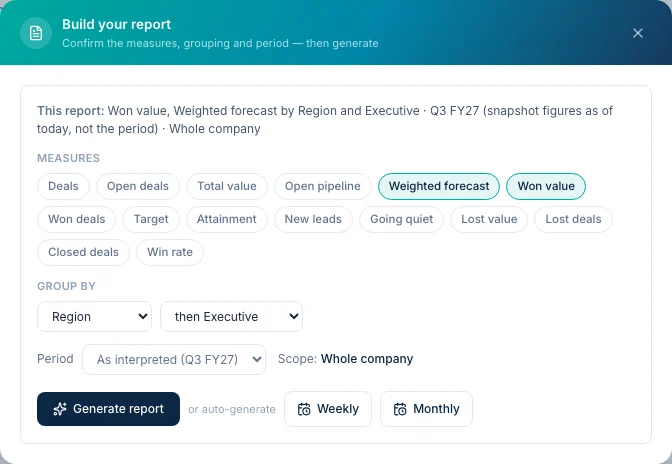
FabTech Pulse, the report builder, sample data
Ask for any report
Working todayFifteen measures, grouped one or two ways, for any period. Generate it and it is saved as a draft, finalised, and printed as an A4 PDF. Or set it to make itself every week or month.
Measures
- Won value
- Weighted forecast
- Open pipeline
- Attainment
- Target
- Win rate
- Won deals
- Lost value
- Lost deals
- Closed deals
- New leads
- Going quiet
- Open deals
- Deals
- Total value
Grouped by
- Region
- Executive
- Stage
- Source
- Temperature
- Lost reason
For
- This week
- This month
- This quarter
- Last quarter
- Any date range
Owners and managers build reports. A manager’s report only ever covers their own team, even when it runs on a schedule.
The weekly sales review, fourteen panels deep.
Built with a sales-process advisor who runs this review for 50 to 60 companies, and checked against his own worked example, which it reproduces exactly.
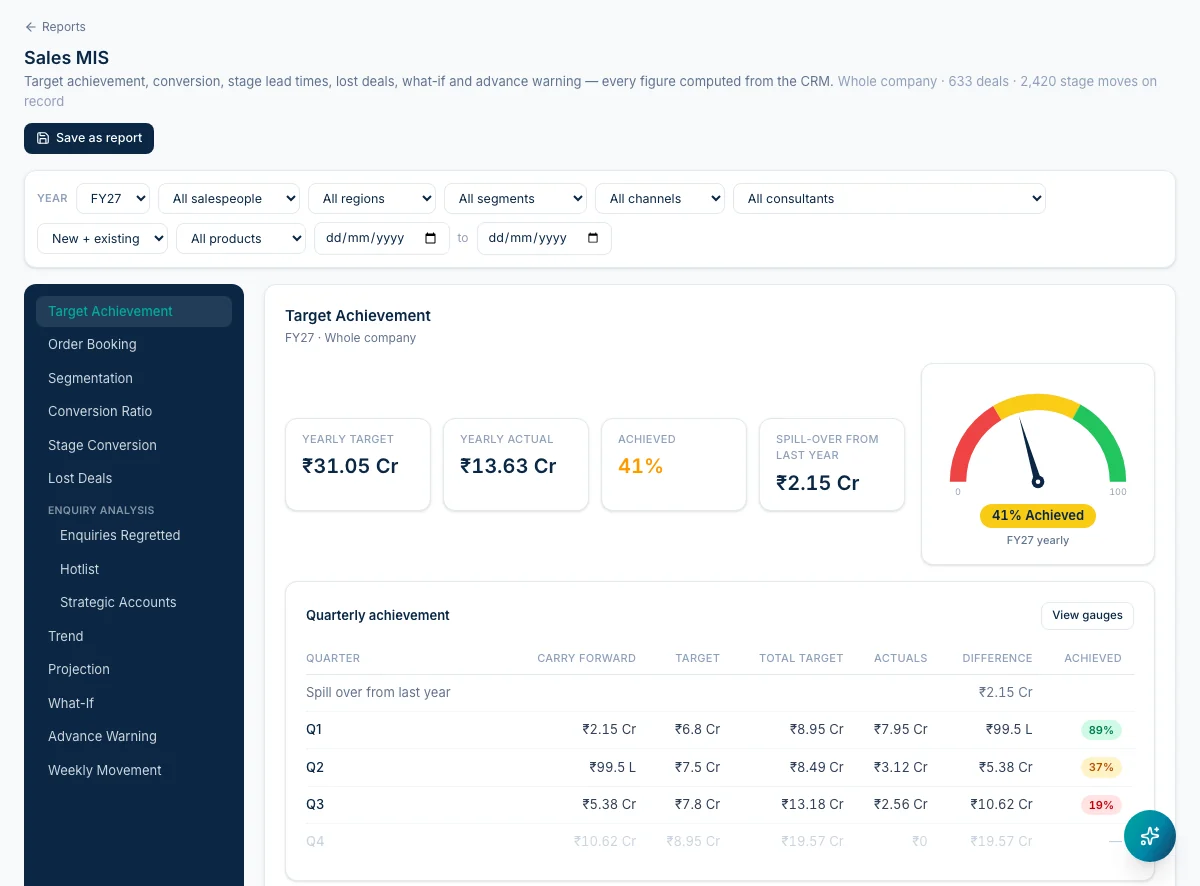
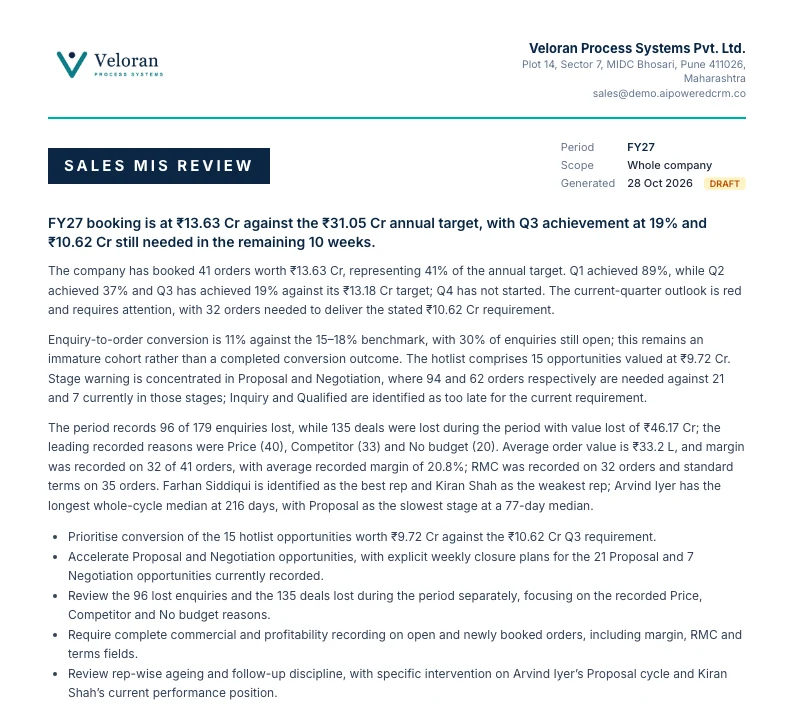
FabTech Pulse, the Sales MIS and its PDF, sample data
- 01Target achievementYearly and by quarter, shortfall carried forward, a gauge per person
- 02Order bookingAverage order value, margin, raw-material cost, standard terms
- 03SegmentationOrders by person, region, segment, channel, consultant, product
- 04Conversion ratioEnquiries won, lost and open, against a 15 to 18% benchmark
- 05Stage conversionTime and conversion at each stage, per salesperson
- 06Lost dealsCount, value, reasons, the competitor and their price
- 07Enquiries regrettedWhat the team chose not to quote
- 08HotlistOpen hot deals with their expected closing dates
- 09Strategic accountsOpen deals at key accounts, with a closing plan
- 10TrendMonthly and weekly orders against a rolling average
- 11ProjectionThe same month in past years, or a labelled run-rate
- 12What-ifWhat this week’s enquiries become, and what each stage needs
- 13Advance warningWhat should be in each stage now to hit the quarter
- 14Weekly movementTwo Monday snapshots compared, deal by deal
Filter by anything.
Year, salesperson, region, segment, channel, consultant, new or existing customer, product and dates.
Save it with a written summary.
The numbers freeze, the AI writes the summary around them, and it prints on your letterhead.
Every threshold is yours.
The red, yellow and green zones, the conversion benchmark, the raw-material cost band, the hotlist rules.
A rhythm the leadership can run on.
A pack for the quarter, a dashboard for every role, and a plan for every rep each morning.
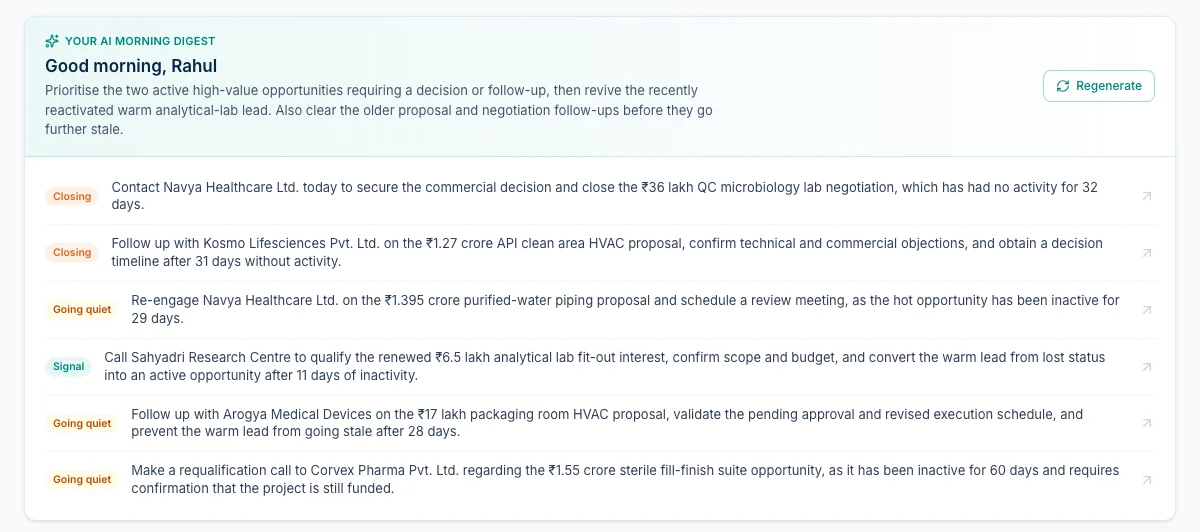
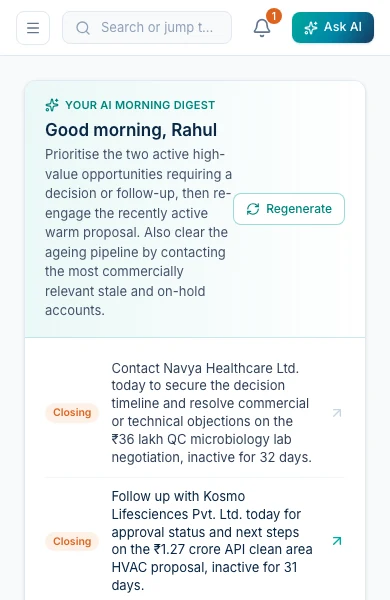
FabTech Pulse, a rep’s morning plan at 8, sample data
The full report pack
Working todayOne command builds the quarter’s review for the company, one team or one person, with the focus you choose: the full picture, target attainment, pipeline health, or stale deals and risks.
- Headline, summary and eight key numbers
- Target against actual, by person
- Pipeline funnel, leads by source, largest open deals
- Highlights, risks and recommendations
A draft pack is made for every owner and manager on the last day of each quarter.
A dashboard for every role
Owner
Company pipeline, weighted forecast, won against target, deals going quiet, every rep’s attainment.
Manager
Team Pulse: target against won, weighted pipeline per rep, a scorecard and a risk radar.
Executive
The morning plan, tasks, deals going quiet and today’s meetings.
View-only
What the owner sees, with nothing that can be changed.
The weekly rhythm
Weighted forecast
Open value times stage weight: Inquiry 10%, Qualified 30%, Proposal 50%, Negotiation 70%.
Quarterly targets
Per person, April to March. A win counts in the quarter it closed, a date nobody can edit.
Weekly briefing
Every Monday: won, lost and new, and the three biggest deals going quiet.
Escalation
After 2, 5, 14 or 7 business days by stage, the rep gets a task, then the manager hears.
FabTech PA, the CRM’s arm
Tell it, and it gets done.
The CRM holds every deal. FabTech PA is how people reach it from wherever they are: a voice note or a line of text on Telegram, and the work is filed, handed over and followed up.
Where people use it
On Telegram and the web
remind me to call Mehta tomorrow 4pm
Files it under the right client, works out the time in IST, and reminds you at 4 with Done and snooze buttons.
ask Vivek to send the Acme quote by Friday 5pm
Puts it on Vivek’s list, tells him on Telegram at once, and tells you when he finishes.
where are we with Mehta?
Answers from everything you have told it. With no record, it says so instead of guessing.
send me the Acme quote
Sends the file itself back. PDFs, Word, Excel and photographed pages are read when they arrive.
After a meeting, and after a tap
meeting notes: met Raj from Acme. I will send the revised quote by Friday. Raj will send the signed MoU by Wednesday.
Turns the recap into your tasks, your team’s tasks and what the client promised, each with its time.
email priya@acme.in that tomorrow’s review moves to 4pm
Writes the email and shows it on a card. Nothing goes until you tap Approve.
Inside the CRM
move the Navya deal to negotiation
Moves the deal on the pipeline after a tap, and logs it on the deal’s timeline.
spoke to Raj, he wants delivery in two lots
Writes the note onto the right deal and updates its next step.
what’s closing this month?
Answers from the pipeline, inside your own permissions.
call Ajay at Kumaon Labs
Places the call. Today it reminds you to call, with the context.
States checked against the product on 21 November 2026
The CRM knows the deal.FabTech PA knows the day.
Joining the two is the next build. The CRM keeps the lead and its next step. FabTech PA is the voice and the alarm clock.
FabTech Pulse
ProposalNegotiation
Annual supply contract
Northwind
₹64 L
FabTech PA
How the join will work. Not built yet.
- A new lead or a stage change reaches the right person’s phone, with a reminder at an exact time.
- After the call, they say what happened.
- FabTech PA updates the CRM, after a tap.
How the AI is built, for the people who will ask.
It is useful because it is fenced in. Most of these rules are enforced in code and in the database, not left to a prompt.
The code computes every number. The AI only writes the words around them.
Numbers come from code.
Forecasts, attainment, reports and digests are computed in code. The AI writes around frozen numbers.
It sees what you can see.
Every question runs inside the asker’s permissions, enforced by row-level security in the database.
It proposes. A person confirms.
Actions show a confirm card and run with the user’s own rights. Only plain code sends.
It answers from the record.
Answers come from the records it is given, with links. With no record it says so.
Content is data.
Text in an email, a lead or a file is treated as data. Nothing read can start an action.
No AI on the critical path.
Stage moves, targets, escalations and merges run through audited database functions.
Prices are never invented.
A quote fills a rate only when the thread states one. The proposal writer cannot write a rupee figure.
Spend has hard limits.
300 calls a day per person, ₹35,000 per company every 30 days, a daily alert and a kill switch.
The model is a part.
Models are chosen per task and swapped by configuration. It has already run on more than one provider.
Every failure has a fallback.
If the AI is slow or down, briefings and reports fall back to plain text from the same data.
Compare
Against Salesforce.
Salesforce is the benchmark, and it is very good at what it does. This is where we match it, where we differ, and where we are ahead for an Indian company that sells projects.
Built for one company.
Your stages, sources, letterhead, MIS and targets are part of the product, not settings someone maintains.
AI in the seat price.
No credits to buy and no bill per action. Hard caps, written in code.
Plain English, exact numbers.
The AI builds the report and writes the summary. Code owns every figure.
Made for Indian project sales.
Rupees in lakh and crore, GST on quotations, the April to March year, Projects Today and consultants built in.
Built around
Lead IntelligenceYour process: your stages, sources, documents, targets and review pack, for Indian project sales.
SalesforceA general platform each company configures, usually with an admin or a partner.
Who sets it up
Lead IntelligenceWe do. Letterhead, stages, users, targets and imports are configured for you.
SalesforceYour admin or a partner. Reviewers often cite its complexity and the support it needs.
How AI is paid for
Lead IntelligenceIncluded in the seat. Fair-use caps are hard limits, not a bill.
SalesforceCore is $195 a user a month with 500,000 Flex Credits a year for the org, then about $0.10 an action, or a $150 per user add-on.
Reports in plain English
Lead IntelligenceThe AI builds the definition, code computes every figure, the AI writes the summary.
SalesforceExcellent standard reports and Tableau Next (Core and above). Agent answers are generated and billed per action.
Management review
Lead IntelligenceA full report pack today, and a 14-panel Sales MIS built with a sales-process advisor (switching on).
SalesforceDashboards your admin or partner builds to match your review.
India
Lead IntelligenceRupees in lakh and crore, the April to March year, Indian time, GST on quotations. Data in Mumbai.
SalesforceAn India region on Hyperforce. Pricing published in US dollars.
Assistant
Lead IntelligenceFabTech PA on Telegram and the web: voice notes, reminders, handover, a morning briefing.
SalesforceSlack and the mobile app. WhatsApp agents need a $75 per user add-on, plus Meta’s fees.
Agents that prospect
Lead IntelligenceNot our focus. It helps reps work the leads they have, and nothing goes out without a person.
SalesforceAhead here. Its SDR agent emails inbound leads, handles objections and books meetings on its own.
Salesforce list prices and terms from salesforce.com, checked 21 November 2026
What you would expect from Salesforce is here too.
The basics are not where the two differ.
- Pipeline with stages and weights
- Lead, account and contact records
- Full activity history
- Email synced with your mailbox
- Meetings from the record
- Quotations and documents
- Role-based permissions
- Sharing and reassignment
- Audit trail
- Dashboards and reports
- Forecast and targets
- Custom fields
- Import and export
- Works on a phone
The AI CRMs, side by side.
Each has real strengths. Salesforce leads on agents and analytics, Zoho on price and its Indian presence, Microsoft on Outlook and Indian data centres, HubSpot on speed of setup. Here they are on the questions that matter most to a company like yours.
| Lead Intelligence | Salesforce | HubSpot | Zoho CRM | Dynamics 365 | Attio | Pipedrive | |
|---|---|---|---|---|---|---|---|
| List price, per user a month | One all-in seat, AI included | $25 to $550; Core $195 | Pro ₹7,497, Enterprise ₹12,500, plus paid onboarding | ₹800 to ₹2,600 | ₹5,410 to ₹12,480, plus GST | $100 a workspace, $79 per extra user | $14 to $79 |
| How AI is billed | Included. Hard caps, no credits | Flex Credits, about $0.10 an action, or $150 per user | Monthly credits that expire; $1 per lead prospected | Agents free; tokens paid past a free allowance | Copilot Credits, $0.01 each | Credits per user and per workspace | Included; agents still in beta |
| The AI takes actions | Yes, after a confirm card or an Approve tap | Yes, and can run on its own | Yes, and can send without review | Partly: follow-ups and field updates | Yes, sends outreach on its own | Yes, after approval | Mostly drafting |
| Reports from plain English | Yes. Code computes every figure | Tableau Next, Core and above | Single-object AI reports | Yes, through Zia | A research agent Microsoft says can make mistakes | Not confirmed | Yes, on all plans |
| Data held in India | Yes, Mumbai | Yes, Hyperforce India | No: EU, US, Canada, Australia | Yes, Mumbai and Chennai | Yes, Pune and Chennai | No: EU and US | No: UK for Indian sign-ups |
| Next | $75 per user add-on | Needs Marketing or Service Hub | On all paid editions | Through the contact-centre product or partners | Not confirmed | Growth and up, in beta | |
| Who fits it to your process | We do, inside your instance | Your admin or a partner | You, with paid onboarding | You or a partner | Usually a partner | You | You |
List prices on annual billing from each vendor’s own pricing page, checked 21 November 2026; Pipedrive’s from a third-party check on 10 November 2026. Sources: salesforce.com/sales/pricing, salesforce.com/agentforce/pricing, hubspot.com/pricing/sales, zoho.com/crm/zohocrm-pricing, microsoft.com/en-in/dynamics-365/products/sales/pricing, attio.com/pricing, and each vendor’s published hosting pages.
Who sees what, and where it lives.
Access follows the reporting line and is enforced inside the database, not just hidden on the screen. The copilot and every report run inside the same walls.
Stored in India.
The app runs in Mumbai and the database sits in AWS Mumbai. Each client has its own instance.
Enforced in the database.
Every read and write is checked against the reporting line. Consultants are tested against fourteen internal tables and can read none.
Nothing is deleted.
There is no delete path. Merges can be undone. A final document is locked with the letterhead it was issued on.
An audit trail only the database writes.
Owner, stage, value, merges, documents, targets, shares and role changes, before and after.
Careful with mailboxes.
Microsoft 365 is asked only to read and send. Company-mailbox passwords are encrypted, and it stops after two failed logins.
Sharing with limits.
A share never gives more than the sharer has, and lapses if they lose the deal.
It plugs into what the sales team already uses.
The mailboxes, calendars, website and lead sources a company already has. Each one with its true state.
In use in production.
- Outlook and Microsoft 365Email goes from the rep’s own address. Client replies land on the deal.
- Company mail serverAny company mailbox, connected over IMAP and SMTP.
- Outlook calendar and TeamsBook a meeting from a lead, with the contact invited.
- Website enquiry formAn enquiry lands in the CRM for an owner to assign.
- Visiting card scanPhotograph a card and the new lead fills itself in.
- Projects Today listingsA listing screenshot becomes project, company, value and contact.
- Consultant portalConsultants submit referrals and track only their own.
- Spreadsheet importExisting leads from a CSV file, checked row by row first.
The code is finished. It waits on a key, a sign-in or a final check.
- Gmail and Google WorkspaceThe same mailbox connection, for Google mail.
- Google Calendar and MeetMeetings from a lead, with a Meet link.
- WebhooksTells another system when a lead arrives, moves, or a document is final.
Designed, not yet built.
- FabTech PA, joinedA deal moves and the right person hears on Telegram. Their reply updates the CRM after a tap.
- WhatsAppA second channel to clients, alongside email.
Status
What is working, what is switching on, what is next.
Every tag on this page uses these three states. Checked against the products on 21 November 2026.
Working today
In use now. Ask for it and it happens.
- FabTech Pulse: six ways in, pipeline, timeline, quotations, invoices, proposals, dashboards
- The copilot: briefings, drafts, scores, answers, and three actions with a confirm card
- Reports: plain-English reports, the full pack, scheduled drafts, the weekly briefing
- Email and meetings: Microsoft 365 and company mailboxes, Outlook and Teams
- FabTech PA: reminders, handover and answers on Telegram and the web
Built, switching on
The code is finished. It waits on a key, a sign-in or a final check.
- The Sales MIS: fourteen panels, in testing with the client
- Gmail and Google Meet: for the CRM, alongside Microsoft 365
- Webhooks: signed events to other systems
- FabTech PA email, calendar and meeting notes: each after an Approve tap
Next
Designed, not yet built.
- FabTech PA joined to the CRM: move deals, log updates and answer pipeline questions from Telegram
- WhatsApp: a second channel to clients, alongside email
- Phone calls: from the assistant, when a reminder is ignored
Built for one sales team. Made to grow.
Press P to present this page as a deck.
- Every lead from every source lands on one record, and every move on it is logged.
- Reports, packs and the review are computed by code. The AI writes the words around the numbers.
- FabTech PA takes instructions on Telegram today, and joins the CRM next.